
WhatsApp group links on SocietiesLink are organized by topic, language, country, gaming, education, social interests and practical WhatsApp help. Use the category sections below to reach the most relevant page instead of scrolling through one oversized list. Third-party invite links are controlled by group administrators and can change over time.
Last updated: 12 November 2026
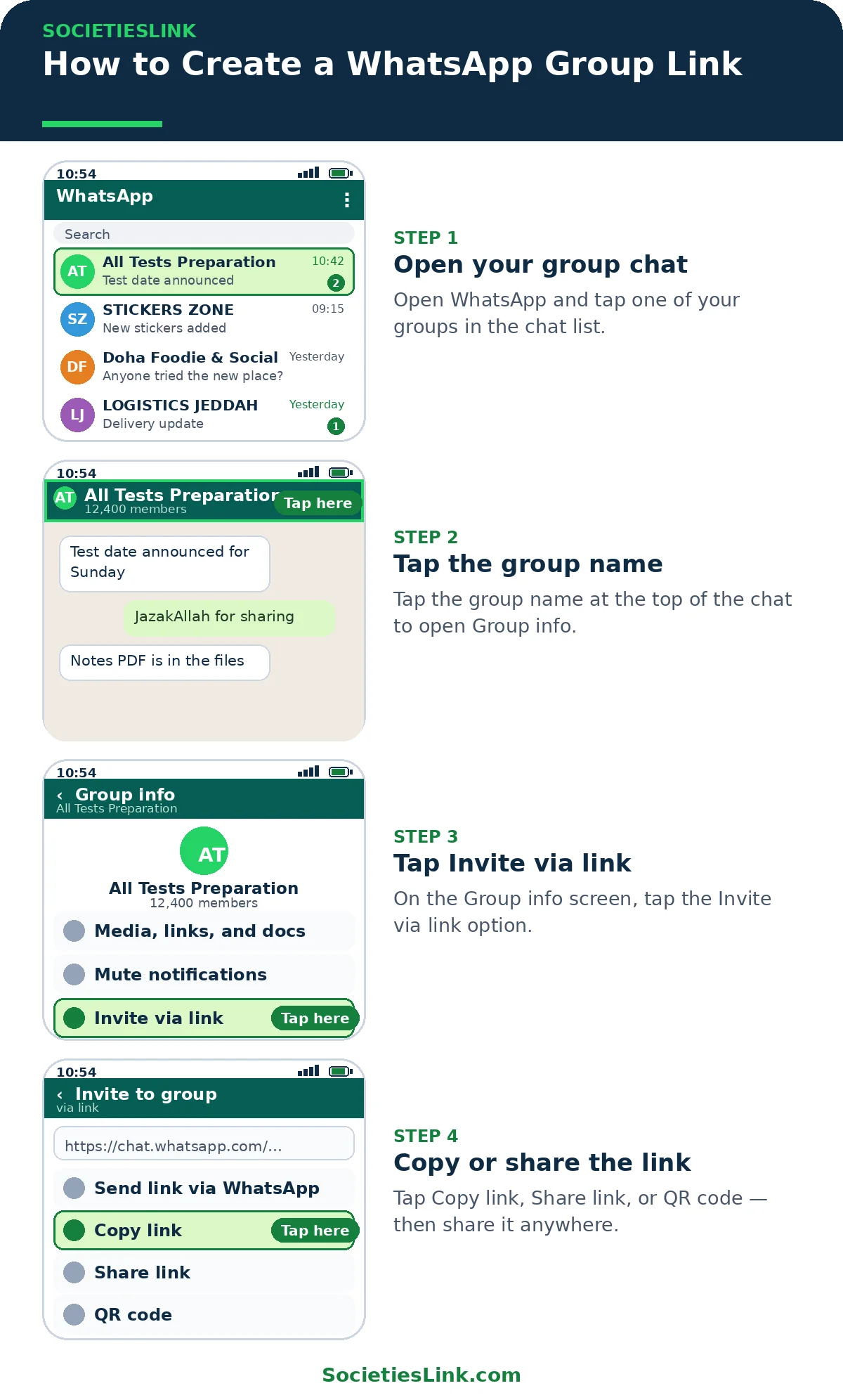
How to Create a WhatsApp Group Link
If you run a group, you can create a link for it in a minute. Only a group admin can create or reset the link.
- Open your group in WhatsApp and tap the group name at the top.
- Tap Invite via link (on iPhone: Invite to Group via Link).
- Tap Copy link, Share link, or show the QR code.
- Anyone with the link can preview the group and tap Join Group.
If a link stops working, the admin may have reset it. Ask the admin for the new link, or check our fixes: WhatsApp Group Invite Link Not Working? 7 Fixes for Expired and Broken Links
How to Join a WhatsApp Group
- Pick a category below — for example Pakistani, Saudi Arabia, Jobs or Study.
- Open the category page and tap the Join button next to a group.
- WhatsApp opens the group preview. Check the group name and description first.
- Tap Join Group.
If a group is full (WhatsApp allows up to 1,024 members) or the link was reset by the admin, try another group in the same category.
Join Popular Groups Directly
Tap a group to preview it in WhatsApp.
| Group | Category | Join |
|---|---|---|
| قرووب تعاوني (مغتربين المملكة🇸🇦) 2 | Community | Join |
| LOGISTICS JEDDAH 🇸🇦 | Jobs | Join |
| DUBAİ JOBS & CHAT🇦🇪 | Jobs | Join |
| Founders Connect – Sharjah | Business | Join |
| 🛫🌎 Abroad Jobs 2 🌎🛫 | Jobs | Join |
| 🍎Doha Foodie & Social | Food & Community | Join |
| All Tests Preparation | Study / Education | Join |
| Ghazi Islamic Institute (GII) | Islamic / Education | Join |
| All Karachi properties Sale/Purchase/Rent | Property | Join |
Popular WhatsApp Group Links
Start with the pages that historically attract the strongest search demand on SocietiesLink. Each page should stay tightly focused on its own topic rather than mixing unrelated groups.
Browse by Language and Region
Use regional pages when location or language is the main reason you want to join a community.
Gaming and Sports Communities
Find player groups and fan communities without mixing in account sales, cheats, betting or unrelated promotions.
Social and Entertainment Communities
Browse social pages by the kind of content or conversation you actually want.
Learning, Career and Creator Communities
These pages are designed around learning, professional networking and legitimate creator collaboration rather than fake-engagement exchanges.
Safety and High-Intent Guides
Some high-volume searches involve money, public benefits or platform rules. These pages keep the search intent but prioritize official sources and clear red flags instead of presenting random third-party groups as trusted.
WhatsApp Help and Privacy
Use these guides when your goal is to fix WhatsApp, reduce unwanted contact or understand privacy settings.
How to Use a Public WhatsApp Group Link
- Choose the page that matches your topic, language or location.
- Open a group invitation and check the current group name before joining.
- Skip invitations that have changed topic, request sensitive information or lead to unrelated promotions.
Privacy Before You Join
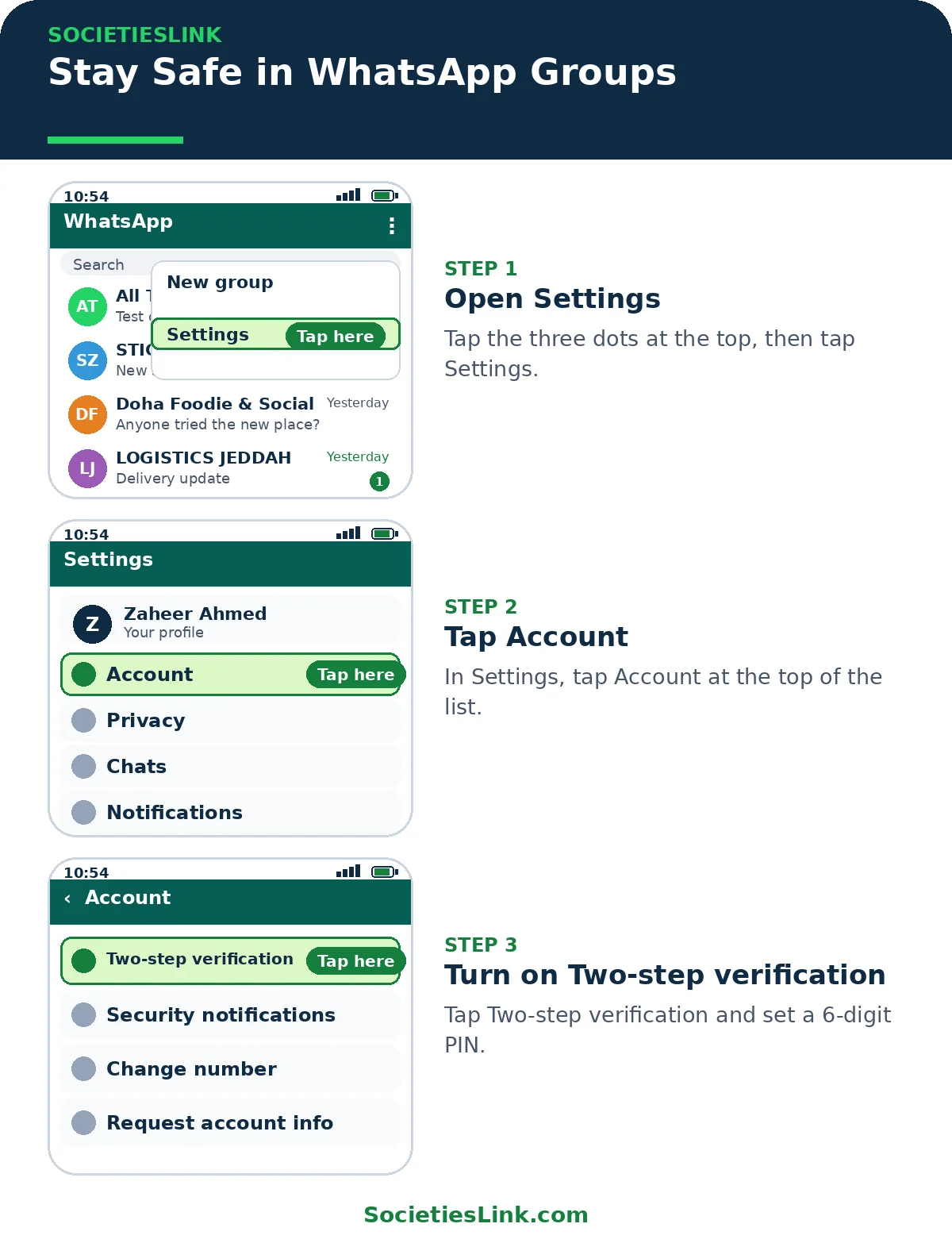
Public groups can expose profile details to people you do not know. Review your WhatsApp privacy settings, use two-step verification, never share OTP or account-recovery codes, and be cautious with payment or investment requests from unknown administrators.
Frequently Asked Questions
What is the best way to find a relevant WhatsApp group?
Start with a specific topic, language, game, country or learning goal. A focused page with fewer relevant options is usually more useful than an enormous mixed list.
Why do WhatsApp group links stop working?
Group administrators can reset invitations, change a group or close access. A third-party invite is therefore not a permanent URL.
Does SocietiesLink own the listed groups?
No. Unless clearly stated otherwise, listed communities are run by third parties. SocietiesLink is a discovery directory and does not control future moderation, availability or member behavior.
How do I create a WhatsApp group link?
Only a group admin can create one. Open the group, tap the group name, then Invite via link, and copy or share the link. See the “How to Create a WhatsApp Group Link” section above for the full steps.
Why does a WhatsApp group link not work?
Usually the admin reset the link, the group is full (WhatsApp allows up to 1,024 members), or the admin paused new joins. Try another group in the same category — for example, the Pakistani, Saudi Arabia or Jobs pages list more groups.
How do I leave a WhatsApp group?
Open the group, tap the group name, then Exit group. You can also report the group or block it from the same screen.
How do I find WhatsApp groups for my city or country?
Use the Region section on this page. For Pakistan, see the Lahore, Karachi, Islamabad, Rawalpindi and Sialkot pages; for the Gulf, see Saudi Arabia, Riyadh, Jeddah, UAE and Qatar.
How do I stay safe in WhatsApp groups?
Don’t share personal information, bank details, passwords or OTPs. Turn on 2-step verification, check your Privacy settings, and leave any group you don’t trust. Our Safety Guides section has more on this.
Group Rules and Staying Safe
- Be respectful. No spam, fake news, hate, or adult content.
- Never share personal information, bank details, passwords or OTPs in a group.
- Turn on 2-step verification in WhatsApp Settings, and check who can see your number in Privacy settings.
- Leave any group you do not trust, and report or block spam.
- See our Safety Guides section for more.
How we keep this directory updated: the groups on this site come from our topic and country pages, and links that no longer work are removed when we find them. If a link doesn’t open, it may have expired or been reset by the group admin — try another group in the same category. SocietiesLink is a third-party discovery directory. We don’t own or control the groups listed here.
Submit Your WhatsApp Group
Run a WhatsApp group? Submit it here. Submitted links are reviewed before they are listed
Final Thoughts
The homepage should function as the clearest route into SocietiesLink: one broad answer for “WhatsApp group links,” followed by strong category paths and practical help — including clear answers for creating and joining a group, how to join safely, and a short troubleshooting guide for expired or broken links.
SocietiesLink is a third-party discovery directory and does not own or control the listed groups.